What's new
What's new in Promoosh
New features and improvements, and what we are planning next.
- New
P&L statement
See revenue, cost of goods, fees and Meta and Google ad spend by day, week, month or quarter, with contribution after ads and margin. Turn on operating costs to see the result, and export the table to Excel.
Read more in the help center → - Improved
More you can ask Claude
Claude can now look up how each metric is calculated (list_metrics), pick a period and compare it with an earlier one, check tracking health and use the Order explorer. Every answer states its period, VAT and refund basis and data source.
 Read more in the help center →
- New
Order explorer
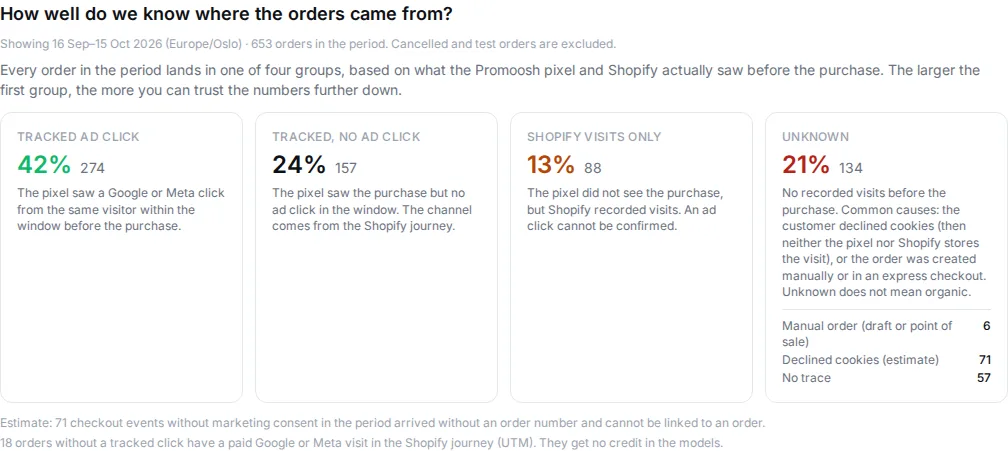
See which orders your ads actually sold, using Promoosh's own attribution. Compare last click, first click and linear side by side, see the coverage per order, and what was advertised versus what was bought.
 Open in the app →
- Improved
Ask Promoosh shows how it finds the answer
You see the progress while the answer is being prepared, and can expand which numbers were looked up. Your conversations are private, and the assistant can answer questions about how Promoosh works.
Open in the app → - Improved
Content engine: pick a topic, get internal links
Create a new post about a chosen collection, selected products or a theme of your own. Posts automatically link to relevant products and collections, and you can add your own keywords and focus keywords to the plan.
Open in the app → - Improved
Competitors: less manual matching
Products with identical names are matched automatically, the key figures filter the list of price gaps, and your own products link straight to the Shopify admin.
Open in the app → - Improved
Simpler Google and Meta setup
One Google connection sets up both Google Ads and Merchant Center. If you have only one active ad account in Meta, it is picked automatically.
 Read more in the help center →
- New
Invite colleagues
Invite colleagues to your organization under Settings. If you belong to several organizations, switch between them at the top of the app.
Open in the app → - Improved
Smart labels: pin a label yourself
You can now pin the label on a product manually, and a new rule marks products with a high profit per sale.
 Read more in the help center →
- Coming
Planned: Profit and POAS per ad
Planned: profit and POAS per ad in Google Ads and Meta Ads. The aim is to see which ads make money after product costs, not only which ones sell.
- Coming
Planned: Reports by e-mail on your own schedule
Planned: scheduled report delivery. The idea is that the weekly report will arrive by e-mail automatically, to the people you choose.