Connect Google and Meta
How to connect Google Ads, Google Merchant Center and Meta Ads, and what each connection is used for.
All connections are under Settings → Connections. You can also connect in the setup wizard.
Google Ads
- Click Connect Google Ads, sign in with Google and approve access.
- Choose the ad account Promoosh should read from.
- Under Google Ads campaigns, choose which campaigns count. All are included by default.
Google Ads is used in Ads Performance, in Profitability and in the POAS figures.

Google Merchant Center
Connect Google Merchant Center is used by Smart labels, which writes the labels as a custom label in your product feed. If your Google sign-in has several Merchant Center accounts, enter the account ID you want to use in the Smart labels settings.
Meta Ads
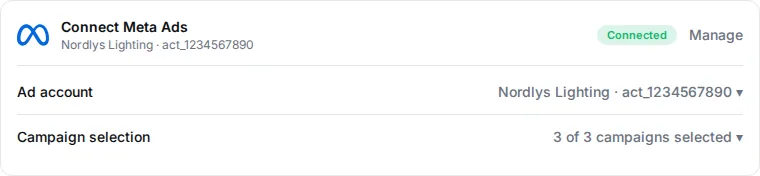
- Click Connect Meta Ads and sign in with the Facebook account that has access to the ad account.
- Choose the ad account.
- Under Meta Ads campaigns, choose the campaigns. The chosen campaigns are used for ad spend, profitability and analyses.
If Meta isn't connected, or no ad account is chosen, Meta Ads campaigns says “Meta Ads isn't connected yet, or no ad account is chosen.”
Supported today
| Integration | Status |
|---|---|
| Shopify | Supported |
| Google Ads | Supported |
| Google Merchant Center | Supported |
| Meta Ads | Supported |
| Fiken | Supported |
| Claude | Supported |
| WooCommerce | Coming later |
| Magento | Coming later |
| TikTok Ads | Coming later |
| Snapchat Ads | Coming later |
| Pinterest Ads | Coming later |
| Tripletex | Coming later |
| DataForSEO | Coming later |
| ChatGPT | Coming later |
| Coming later | |
| Google Search Console | Coming later |
| WordPress | Coming later |
Integrations marked “Coming later” cannot be connected yet. If a channel is missing from your figures after connecting, see Troubleshooting.
Last reviewed 30 October 2026